01
Smart Dispatch, with a reason
Select a whole queue and let Rivo recommend available drivers using priority, time windows, current workload, and route capacity. Preview the plan, see why it was suggested, then apply it when you are ready.
Last-mile delivery software for local business
Everything you need to run local delivery. Dispatch. Route. Track. Deliver. Rivo gives your team a fast, focused command centre without enterprise software complexity.
45-second product walkthrough
Follow one clear workflow from connected orders and batch dispatch through route editing, driver execution, customer tracking, and the final completion record.
One workspace. In-house or courier delivery.
Built for florists, pharmacies, bakeries, meal prep teams, retail shops, and local courier operations. Rivo keeps dispatch, drivers, courier partners, and customers in one operating view.
Select a whole queue and let Rivo recommend available drivers using priority, time windows, current workload, and route capacity. Preview the plan, see why it was suggested, then apply it when you are ready.
Bring in supported order data from Shopify, WooCommerce, Wix, or a universal JSON webhook without rebuilding your storefront.
Share a focused tracking page with automatic refresh without sending customers to a third-party marketplace.
Give in-house drivers the mobile workflow, or hand selected orders to a saved courier partner and keep the request status, reference, fee, and tracking link beside the delivery.
Capture a delivery photo or recipient signature with an optional recipient, timestamp, notes, latest shared location when available, and structured failed-delivery reasons.
Review recorded business kilometres, per-kilometre pay estimates, driver activity, weekly approvals, and CSV exports.
Live operating loop
Dispatch sees what is happening now. Drivers know what is next. Courier handoffs stay visible. Customers stay informed. Owners can review the complete day without reconstructing it from messages.
The actual control room
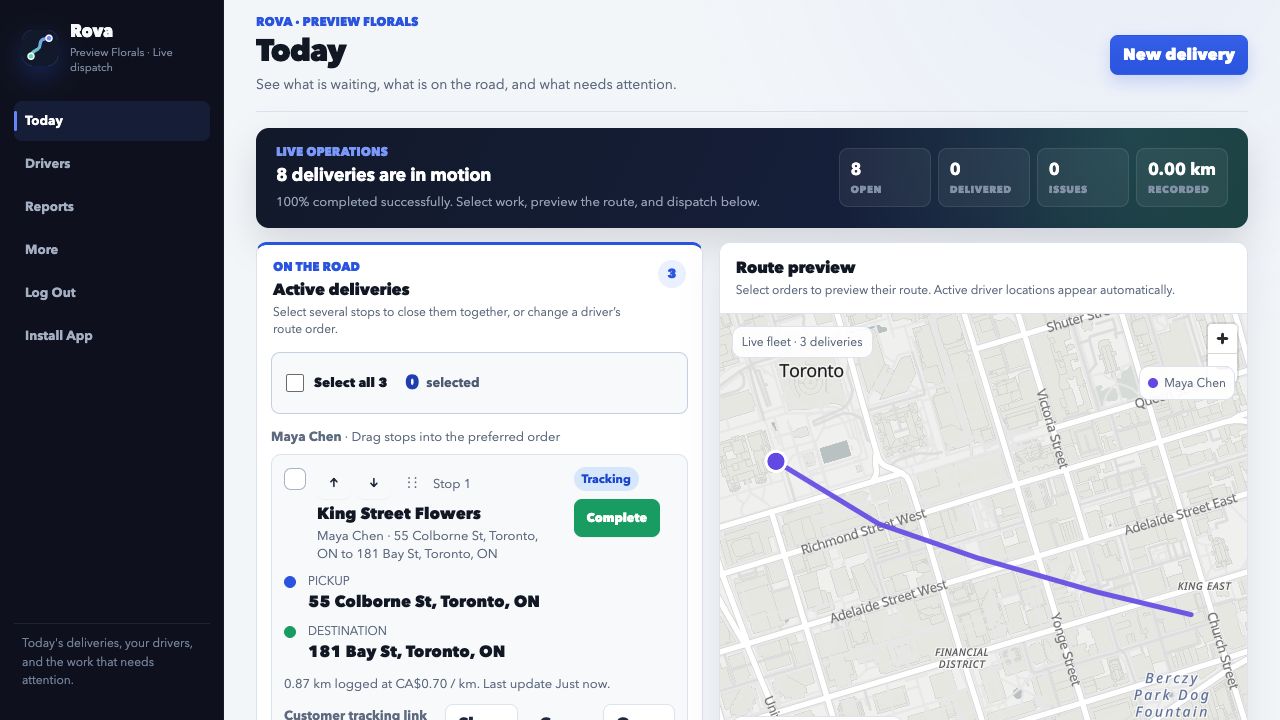
Active stops, queued orders, bulk actions, route order, and the live map share one workspace. The screenshot is the current Rivo product—not a stock dashboard.
Select and dispatch in batches. Search a queue, choose several orders, assign once, then preview the route.
Run active work beside the map. Reorder stops, edit deliveries, close several jobs, and keep exceptions visible.
Give every role a focused view. Dispatch controls the day; drivers see only their route; customers see only their delivery.
Paid home and return mileage
Save each driver’s home address and create Home → Work or Depot → Home trips when those movements are paid. Keep delivery mileage, paid commute legs, estimates, and weekly approval in the same record.
Practical access controls
Access follows the job. Dispatch controls the workspace, drivers see only their assignments, and each customer link is scoped to one delivery destination.
Dispatch generates a single-use link that expires after seven days. Configured accounts can email it automatically; otherwise dispatch can share or copy it directly.
A driver account loads that driver’s profile and assigned trips without exposing the dispatcher’s roster, sales pipeline, or other drivers.
A customer tracking link shows the delivery status, assigned driver or courier update, and that customer’s destination—not other stops, partner contacts, or private route notes.
A guided rollout, not a software maze
Plans start at $99 CAD per month. Set up the workspace, add a driver, and enter the first delivery manually—or connect your store when you are ready. Nothing is billed until a plan is confirmed.
Questions teams ask before switching
Dispatch adds the driver’s email and Rivo creates a secure invitation. The driver opens it once, chooses a password, and signs in by email from then on. Dispatch can issue a new link for an expired invitation or password reset.
Yes. Select multiple orders for a driver, sequence the stops with route optimization when Google Routes is configured, preview the route, and drag active stops into a different order before opening navigation.
Yes. Assign selected orders to an in-house driver or a saved courier partner. Rivo keeps the courier request, status, reference number, fee, and tracking link beside the order. Automatic email sending requires a configured account sender and an email request method for that partner; otherwise dispatch can open or copy the prepared request, clearly marked as not sent.
Drivers can take or choose a photo, collect a recipient signature, enter who received the order, and add a note. Rivo also records the outcome, time, driver, latest trip location when available, and any structured delivery issue for dispatch review.
No. Location sharing is tied to active trip work and can be paused. The driver screen shows when sharing is on, while dispatch sees the latest update for active deliveries.
Rivo supports Shopify, WooCommerce, and Wix connections, plus a universal webhook for Squarespace, Square, Make, Zapier, custom sites, and other systems that can send order data.
Yes. Save a driver’s home address, create Home → Work and Depot → Home legs, and keep those business trips in the same mileage and weekly approval flow.
No. Rivo sits behind the storefront or order source you already use. Customers keep buying through your brand while paid delivery orders move into the dispatch queue.
Rivo Guided Onboarding · Canada
Every rollout begins with a structured operational review. We configure your order flow, drivers or courier partners, delivery rules, and first routes with you. Your team then runs a 14-day evaluation in its own operating environment before confirming a plan.
Bring your current drivers, preferred delivery providers, routes, service windows, and customer workflows into Rivo. We connect to the website or API you already use and roll out around how your team works.